Let the games begin…

So the 2019-2020school year has begun. Most students are beginning to settle into a routine, understand expectations and get down to their real work of learning. How can we, as teachers, make this year meaningful for our students?

One way I am trying to do this this year is by introducing more game-based learning into my instruction. Research has found that when children play games their engagement and participation increases and they interact with and absorb the content better. But how should teachers go about introducing game-based content into their classes? Here are a few of the ways I am looking at for the upcoming year and also some upcoming learning opportunities for #NYCSchools teachers who wish to…well…up their game.

Minecraft Education

My own children have been playing Minecraft for years and I never really understood it. I did my best to follow when they spoke about it but after a few minutes of excited speak of lava and creepers and mobs…

GIF of woman looking like she's not following the conversation.
When my children talk about Minecraft.

In 2017 I went to a PD by Sean Arnold and actually had the opportunity to learn how to negotiate the platform. I started to see beyond the blocks to the creative potential. I had previously understood it to be a game where you have to mine and gather in order to survive the monsters that come out at night and to an extent this is true. This in itself is a pretty valuable lesson on wants and needs but there is a lot more to the game than that. In creative mode it is a blank canvass with unlimited building blocks where students and teachers can unleash their creativity. But how does this relate to the classroom? How do we give it the structure that takes it from ‘playing’ to ‘learning’ in the eyes of an administrator who walks into your room?

Minecraft Education graphic of coding agent.

Luckily for us, with the education edition, this has mostly been done for us. It is a free download for Macs, iPads and Windows computers and the site contains a myriad of free lesson plans, prebuilt worlds and biomes, STEM related challenges and classroom activities on all subjects and at levels for all ages. From basic pre-k counting to high school level chemistry. It can also be integrated with coding activities and even export objects to 3D printers. On the site are numerous self-guided tutorials where you can learn the basics. Students can work through the tutorials too but the reality is most do not need to. There are further video courses and ideas for educators on the Microsoft Educators Community.

In my classroom, I have previously used Minecraft Education to promote collaboration and social skills by having students build worlds together that meet certain criteria related to our thematic units. This year, I would also like to focus on how I can set tasks for students related to their individual IEP goals.

Kahoot!

Kahoot! is a free quiz type game I have been using for a number of years and plan to expand on this year. Students log in with any device and participate in a quiz. Quizzes are extremely easy to create. There are also thousands on all subjects created by others that can be duplicated and edited in seconds and the best bit is I get to unleash my inner game show host.

What many do not know is that Kahoot! also collects useful data. At the end of a quiz you can download the data to Google Drive and see the results by question and by student. I find it extremely useful for formative assessment as I introduce a topic. I can see what my students know and what they need to work on both individually and by group. Although I love the gameshow format, some students can find the front of room leaderboard overwhelming. It is possible to play without points and also in challenge mode where quizzes are assigned to individuals to play privately. Kahoot! is fully integrated with Google Classroom, Apple Schoolwork and also Microsoft Teams so it is easy to assign a Kahoot! as homework or a classroom activity no matter what platform you use. Educators can learn more about how they can use Kahoot! and earn certifications on the Kahoot! website.

#NYCSchoolsTech Partner Certification

Speaking of certifications, the fall application window for #NYCSchoolsTech Partner Certification is open! Note: you must sign in with your DOE log in to access.
#NYCSchoolsTech Logo

I can personally recommend the Teq/SMART Digital Teacher Certification, PBS Media Literacy Educator Certification, Microsoft Innovative Educator Trainer, Common Sense Educator, Classcraft Certified Educator and Google Certified Educator. This year I am hoping to get to Nearpod, Promethean, and Pear Deck.

For those of you outside NYC or unable to attend, many of these ed tech companies have pathways to online certification through webinars or video tutorials on their websites. I do like in-person training though. I love having the opportunity to actually spend a day focussing on how I can use these tools in my classroom and get my questions answered by experts. They are also invariably fun. It is not only students who enjoy games after all.
Summit for the Soul

How can a day that begins with a medley of songs from Little Shop of Horrors get any better? The uplifting performance by by neuro-inclusive theater company EPIC Players NYC was a perfectly fitting opening to a thoroughly joyous day. Hundreds of forward-thinking, passionate, enthusiastic educators met at #NYCSchoolsTechSummit to share resources, best practices and innovative ideas. This year the theme was Inclusion and many workshops were on the theme of creating content to provide access to all students.

Characters Audrey and Seymore embrace as chorus looks on singing, hands raised. Backdrop shows group of people with muppets. Wheelchair accessible podium is stage right.
The EPIC Players

Victor Calise , Commissioner of the Mayor’s Office for People with Disabilities spoke about the work and investment that is being put into NYC Schools to make them truly accessible for all. There is a long, long way still to go but the intention, will and at least some of the money is there. Work is being done. The NYC Schools Chancellor, Richard Carranza then spoke about equity in our schools, innovative teaching and his love of project-based learning.

Keynote speaker Jason Green also spoke of project and play-based learning and the needed skill of generativity. This is the very necessary skill of becoming a professional learner. Teachers need to model this behavior of lifelong learning, foster curiosity in students and slowly shift the entire culture of education toward a love of collaboration and learning.

I didn’t get to any sessions other than the ones I was presenting. I heard great things about so many that I will go back and check out. I want to thank my attendees for their participation and asking such great questions. I hope the tools, practices and accommodations I shared will be helpful to them in their classrooms. Yubis Lopez was a fabulous co presenter as always.

A major highlight of my day was receiving a #NYCSchoolsTech Award for Excellence in School Technology. The people I have seen accept this award in previous years are so inspirational, accomplished and driven, that it is a true honor to be named among them. It was an absolute pleasure to meet the Master of Ceremonies Dr Sal Contes Jr too. Huge congratulations to all the other 2019 awardees.

Group photo of 2019 #NYCSchoolstech attendees.
2019 #NYCSchoolsTechSummit Award Winners

We later adjourned to Jake’s Saloon where some of the best connections were made and real plans and ideas were discussed. The staff were exceptionally accommodating to such a large bunch of excited, enthusiastic and exhausted educators. It was such a wonderful event in all. Even though I still have another week or so of summer school to go before my vacation, I am reinvigorated. I am excited to start implementing some new practices in the upcoming school year.

#NYCSchoolsTech Summit

Wednesday July 31st is the annual #NYCSchoolsTechSummit. I am excited to be presenting twice this year! In my first presentation, I will be sharing ways to use Microsoft accessibility features and tools to create inclusive content. In the second, we will be sharing ways we use tech tools and projects to engage and empower our awesomely autistic students. The problem with presenting though is that you don’t get to go to all the other awesome sessions. This year, I’m devastated to be missing presentations by Clay Smith on enhancing PBL with Google Forms script and by Eileen Lennon on creating an inclusive website, and so many more fascinating and informative presentations by #NYCSchoolsTech educators, including Sean Arnold, Cindy Wong, Laura Ogando and Kerry McGarvey. I will get to see the keynote speaker though Jason Green Cofounder and Co-CEO of LINC Learning Innovation Catalyst. This year includes a whole digital inclusion track which I’m really looking forward to.

Logo of #NYCSchoolsTechSummit Man climbing technology mountain. NYC DOE logo

My first #NYCSchoolsTechSummit was in 2016 on recommendation of the fabulous innovative educator, Lisa Nielsen who is one of the chief organizers. I hardly knew anyone who was going. Nervously, I collected my badge, Teq swag bag, and some coffee and ventured into the social media lounge. Here I was immediately greeted by Clemencia Acevedo, another awesome presenter. She gave me a scavenger hunt of Tweets to complete. A task! Naturally shy in new situations, having a task is a really helpful way for me to begin to find people, socialize and network. I had such fun that day and met so many wonderful people who have since become good friends. Everyone on the vendor floor was also super informative in answering specific tech questions I had about their products.

My eyes were also opened to some of the amazing projects going on in NYC schools utilizing tech to promote 21st Century skills. This is where I found my tribe. I recommend any educator attend the summit whether you consider yourself a techie or not. You are bound to find at least one resource or tool you can use to improve your instruction. There are still some registration spots available. Get thee to NYCSchoolsTechSummit Registration right now and claim yours. And don’t forget to come say ‘Hi! when you’re there.

The Road to ISTE 2019

ISTE 2019 Philadelphia

Sometime last year we discovered ISTE was to be held in Philadelphia this year. Philadelphia is only two hours from NYC. Accessible! A group of teachers from NYC decided we should go. Some of us submitted proposals to present.

I and a colleague, Yubis Lopez, submitted a proposal to present on empowering neurodiverse students with ed tech. We planned a showcase of tools we use in our classrooms that have been effective and to outline how we scaffold our instruction and also some of the accessibility tools we use.

To our surprise, our proposal was accepted. Neither of us had ever even been to ISTE before and now we were presenting a 60 minute long BYOD session. Our next hurdle was figuring out how to pay for it. As I am part of the Microsoft Innovative Expert Program (MIEE) and some of the tools I was presenting were Microsoft tools, specifically the game-changing Immersive Reader and Minecraft Education Edition, I was able to apply to the travel program and get my registration, hotel and air travel funded by Microsoft. This was very helpful as our school has no budget for conference expenses.

Yubis Lopez and Jenny Foxe smiling in front of ISTe stage.

So we went and it was awesome. I do not use that word lightly. I will talk in detail about some of the amazing sessions and events I attended in later posts, but I was not prepared at all for simply how many enthusiastic, positive and innovative educators I met there who are passionate about preparing our students for the world of our future. Just to know that so many are out there was definitely the best part of the experience. It renewed my hope in education.

ISTE 2020 is in Anaheim from June 28th – July 1st. We are already planning how to get ourselves there. If at all possible I absolutely recommend you go.

Microsoft Innovative Educator Program

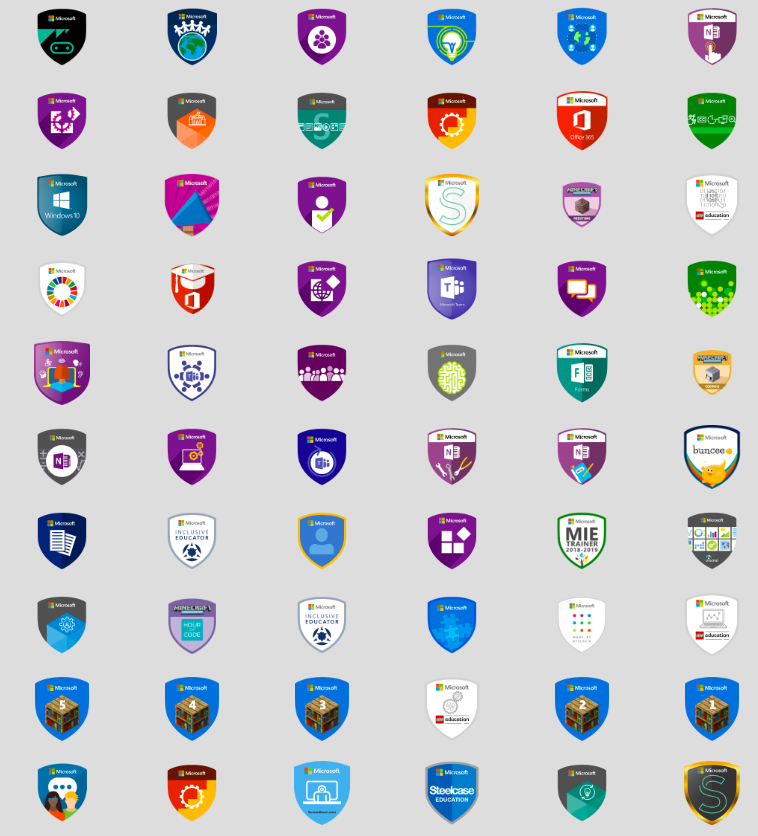
One of the first #NYCSchoolsTech Partner Certification Programs I completed was the Microsoft Innovative Educator Program. Anyone can become a MIE and i highly recommend it. The criteria have changed a bit since I originally completed it but go the Microsoft Educator Community , set up a free account and complete courses on the site until you’ve earned 1000 points. Then you too can earn this wonderful badge along with many others. You can see some of mine below.

Microsoft Certified MIE Badge with Microsoft logo and tree with colored leaves.

There are hundreds of courses you can take on the site. Anything from updating your Office 365 skills to deploying a 1:1 device program across a district. I recommend starting with a learning path. 21st Century Learning Design is a good one that gives a good overview of the whys and hows of integrating technology into instruction in a meaningful way to promote global citizenship.

Although there are courses on this site to keep any educator engaged for hours learning new skills, there is a lot more available too. You can organize a Skype-In-The-Classroom session, share lesson plans and connect with innovative educators all over the world. Go ahead and check it out. It’s a great start to an ed tech learning journey.

Large collection of badges.

Where it all began…

#NYC SchoolsTech Logo credit Sean Arnold

This time three years ago I had never even heard of ISTE. I was a classroom teacher of K-2 autism students in a rather cramped trailer park in the yard of a big school. Our equipment was old and outdated. Much of it was broken and out of warranty. Because I had the ability to sometimes ‘fix’ (read: turn off and back on again) other teachers’ technology – or at least the will to try, I was offered the extra responsibility of joining the tech team of our school representing my site. I will talk more about that in another post or ten.

It was at a tech team meeting where I first heard about #NYCSchoolsTech Partner Certification Programs and I applied. I was told they were very competitive to get into so I was very surprised when I was accepted to all three that I had applied to. The Microsoft Innovative Educator Academy, The SMART Exemplary Educator and the PBS Learning Media Master Teacher programs. I was even more surprised when my principal agreed to release me to attend all three! But he did, and I did. And that, dear readers, is where this journey began.